
Thursday, December 23, 2010

MDX Named set to get Last 3 Quarters
How to get last 3 Quarters from hierarchy with data structure "
[Date].[Calendar Year].[Year].&[2011].&[Quarter - 1]"

[Date].[Calendar Year].[Year].&[2011].&[Quarter - 1]"

MDX Named Set to Get Last 3 Months
How to get last 3 months from hierarchy with structure "
[Date].[Calendar Year].[Year].&[2007].&[Quarter - 3].&[2007]&[8]"

[Date].[Calendar Year].[Year].&[2007].&[Quarter - 3].&[2007]&[8]"

MDX Named set to get Last 3 Years
How to get last three years from hierarchy "" with structure " [Date].[Calendar Year].[Year].&[2007]"
[Date].[Calendar Year].[Year]

[Date].[Calendar Year].[Year]

MDX Named Set to Get Current Month
How to write named set for hierarchy "[Date].[Calendar Year].[Month]" with
structure "
[Date].[Calendar Year].[Year].&[2008].&[Quarter - 2].&[2008]&[5]"

structure "
[Date].[Calendar Year].[Year].&[2008].&[Quarter - 2].&[2008]&[5]"

Tuesday, December 21, 2010
SSIS Incremental Load using Package History
Incremental Load using package History
1. Create Package History table in Warehouse:
CREATE TABLE [dbo].[PackageHistory](
[PackageHistoryId] [int] IDENTITY(1,1) NOT NULL,
[PackageName] [varchar](50) NOT NULL,
[RunDateTime] [smalldatetime] NOT NULL,
[SourceDateTime] [smalldatetime] NOT NULL,
CONSTRAINT [PackageHistory_PK] PRIMARY KEY CLUSTERED
(
[PackageHistoryId] ASC
)WITH (PAD_INDEX = OFF, STATISTICS_NORECOMPUTE = OFF, IGNORE_DUP_KEY = OFF, ALLOW_ROW_LOCKS = ON, ALLOW_PAGE_LOCKS = ON) ON [PRIMARY]
) ON [PRIMARY]
2. Create the variables as shown below:

3. Design ETL Package as shown below:


4. Load staging fact table.
5. Config 'Load Max ODS Date' task as shown below:


1. Create Package History table in Warehouse:
CREATE TABLE [dbo].[PackageHistory](
[PackageHistoryId] [int] IDENTITY(1,1) NOT NULL,
[PackageName] [varchar](50) NOT NULL,
[RunDateTime] [smalldatetime] NOT NULL,
[SourceDateTime] [smalldatetime] NOT NULL,
CONSTRAINT [PackageHistory_PK] PRIMARY KEY CLUSTERED
(
[PackageHistoryId] ASC
)WITH (PAD_INDEX = OFF, STATISTICS_NORECOMPUTE = OFF, IGNORE_DUP_KEY = OFF, ALLOW_ROW_LOCKS = ON, ALLOW_PAGE_LOCKS = ON) ON [PRIMARY]
) ON [PRIMARY]
2. Create the variables as shown below:

3. Design ETL Package as shown below:
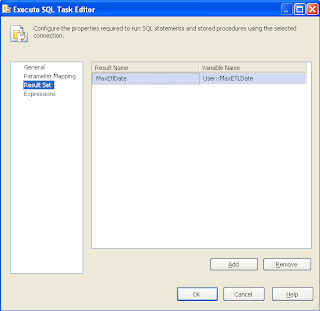
3. Config 'Load Max ETL Date' task as shown below:


5. Config 'Load Max ODS Date' task as shown below:


6. Create tasks to Load fact table. Select data whose modified/createddate > Max(RundateTime) in package history.

7. truncate Staging table.
8. Config 'Insert Package History' task as shown below:

8. When the package is run, the data whose created/modified dates are greater than Max(RundateTime) in package history is loaded in to warehouse.
Monday, December 20, 2010
Schedule Pentaho Jobs
1. Create a batch file with the following codes:
"D:\Downloads\Pentaho Tool\Data Integration 4.0.1 (Spoon)\kitchen.bat" /file:"D:\My Work Place\Project\Telecount\DataLoad\Job_DailyLoadScript.kjb" /level:Basic
i.e., You have to mention the path where Kitchen.bat file present in your system as well as job name and its location.
2. Navigate to Programs --> accessories --> System tools --> Scheduled Tasks and call the batch file and schedule the time it has to process.
"D:\Downloads\Pentaho Tool\Data Integration 4.0.1 (Spoon)\kitchen.bat" /file:"D:\My Work Place\Project\Telecount\DataLoad\Job_DailyLoadScript.kjb" /level:Basic
i.e., You have to mention the path where Kitchen.bat file present in your system as well as job name and its location.
2. Navigate to Programs --> accessories --> System tools --> Scheduled Tasks and call the batch file and schedule the time it has to process.
Subscribe to:
Posts (Atom)